

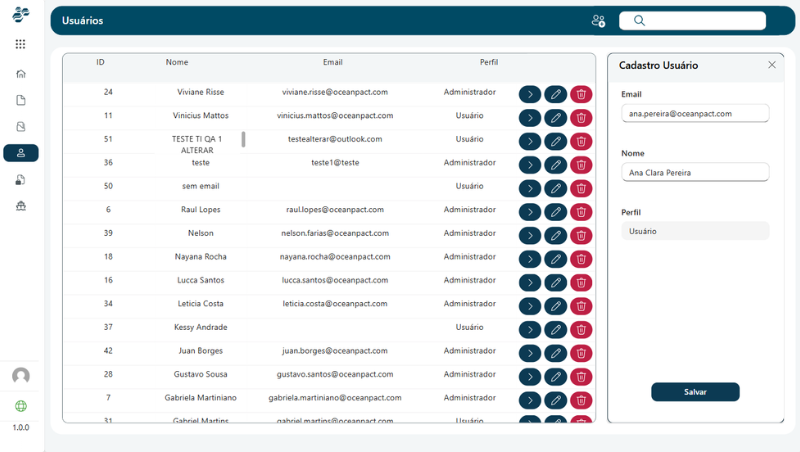
Application Development
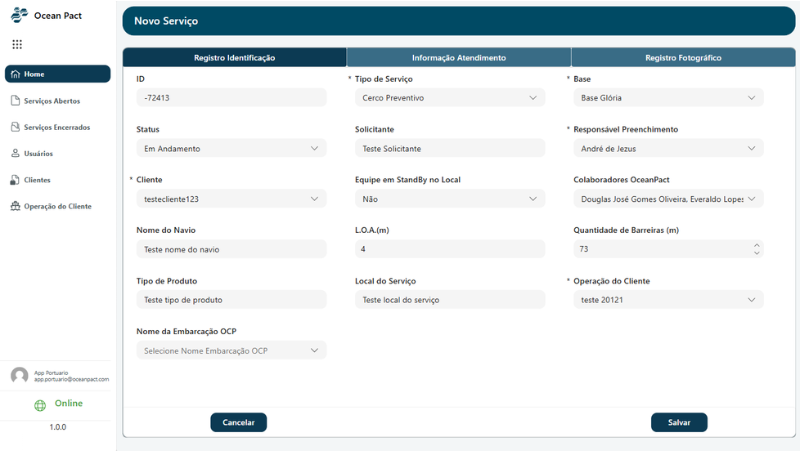
An application was developed using Microsoft Power Apps with the objective of automating the process of registering and managing inspection reports, replacing previously used manual processes. The solution was designed to simplify the operational routine of the commander responsible for completing extensive reports, centralizing all registration steps within a structured digital interface.
The application allows the complete registration of all required information for report generation, and at the end of the process it automatically generates a Microsoft Word document based on the inserted data. This document can be downloaded, stored, or accessed later for editing and updates, ensuring traceability and ease of information management.
Solution Evolution (Version 2)
The solution underwent an architectural evolution (Version 2) with the goal of significantly improving application design, architecture, processing logic, and automation, resulting in a system that is more performant, intuitive, and aligned with Power Platform development best practices.
The implemented improvements can be categorized into three main pillars:
UX/UI Design
Data Architecture
Application Governance
UX/UI and User Experience
New design practices were adopted using modern Power Apps components, along with extensive use of responsive containers, allowing the application to adapt to different screen resolutions and devices, ensuring greater flexibility in usage.
Among the user experience improvements implemented, the following stand out:
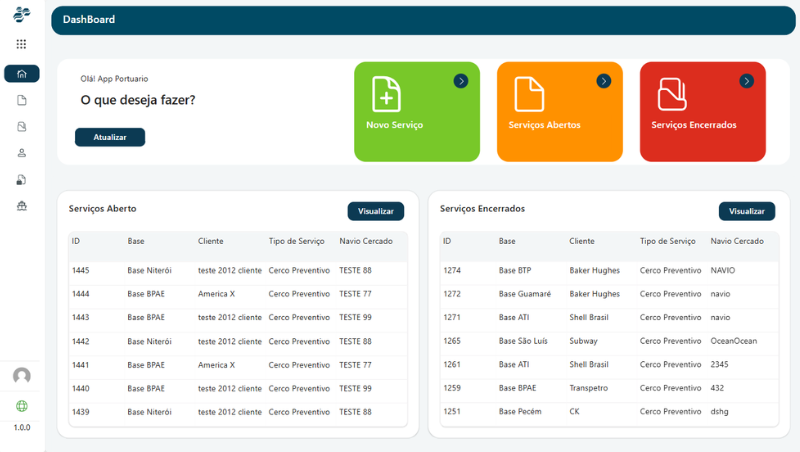
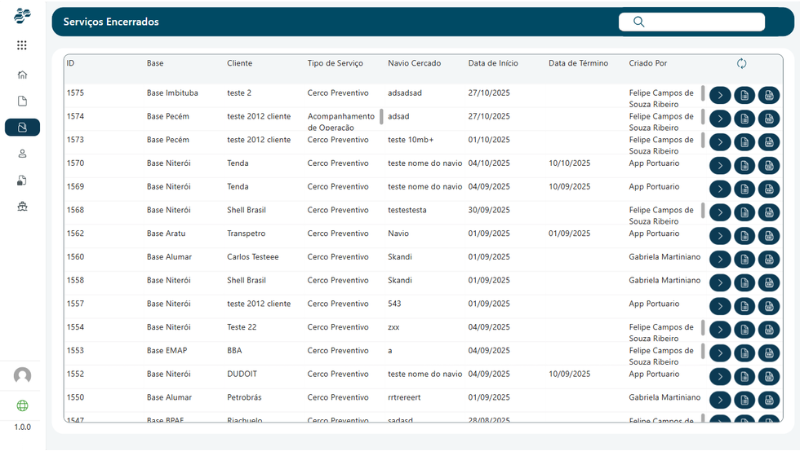
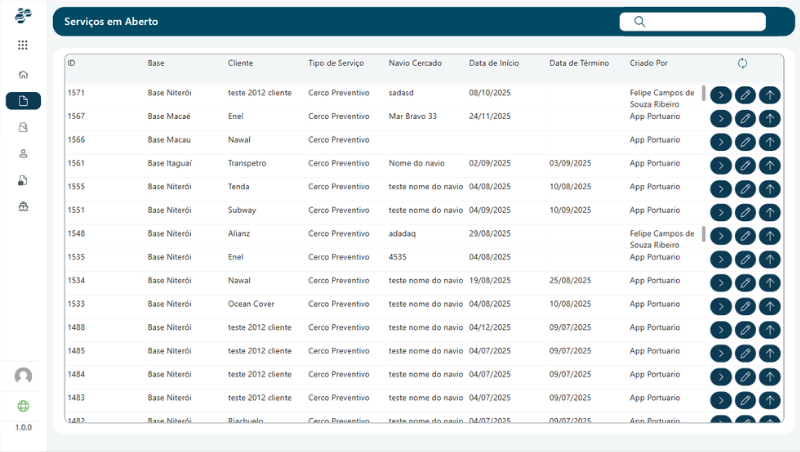
Informational dashboards with quick indicators, displaying information about open and completed reports, reducing the need for constant navigation between screens.
Shortcuts for frequently used features, optimizing the navigation flow within the application.
Expanded navigation menu, enabling faster and more intuitive movement between different screens.
Integrated search bar, allowing users to quickly locate records and relevant information within the system.
These improvements were designed with the goal of reducing operational time and improving the efficiency of end users.
Application Architecture
The application architecture was structured based on local collections and form-based data entry segmented by registration categories, a strategy that directly contributes to better application performance and improved logical organization of information.
Key architectural concepts implemented include:
Extensive use of Collections to temporarily store data during user interaction with the application.
Modular registration structure, organized by sections to facilitate system maintenance and future evolution.
Support for offline functionality, since data is initially stored locally and later synchronized with the database when an internet connection is available.
The data persistence process was implemented through Power Automate Flows, responsible for sending the collected data from the application to the database. This approach provides several advantages, such as:
An additional security layer for data transmission
Centralized integration logic
Improved auditability and easier log analysis for troubleshooting
Standardization and Reusability of Elements
To ensure greater scalability, visual consistency, and easier maintenance, global variables were used to centralize reusable configuration parameters within the application. This approach allows multiple settings to be defined in a single location and reused across different components and screens, promoting consistency and reducing maintenance effort.
Among the main elements stored in global variables are:
Application color palette, ensuring visual consistency across the entire interface.
Visual and layout parameters, such as font sizes, spacing, component styles, and UI standards.
Reusable configuration settings across multiple screens, supporting consistent behavior across the application.
Global application states, used to control dynamic behaviors such as component visibility, loading states, and navigation permissions.
Navigation and screen control parameters, simplifying the management of transitions and application flows.
Default values and operational settings, used throughout the system to maintain consistency in data handling and business logic.
This strategy enables structural, visual, or behavioral changes to be applied in a centralized manner, avoiding the need to manually modify multiple components across the application. As a result, the system becomes more organized, modular, and prepared for future expansions, significantly reducing maintenance effort and minimizing the risk of inconsistencies in the interface or application logic.
Final Solution Concept
The development of this solution aimed to align three fundamental pillars:
Optimized UX Design
Efficient Data Architecture
Application Security and Governance
As a result, the final product is a fast, intuitive, secure, and scalable application, designed to support future expansions while maintaining high maintainability, which is essential for the continuous evolution of the solution within the Microsoft Power Platform ecosystem.